Keyword Search
A search box appears on the menu bar of all pages as well as on the home page. You can search for any identifier, name, symbol or keyword.

Examples of what you can search:
Single terms:
Gene identifiers (e.g FBgn0000606) Gene names (e.g. Notch) Gene symbols (e.g. eve) Keywords (e.g. Diabetes, embryo)
Two terms:
To search for either of two terms, use OR. (e.g. fly OR drosophila).
Phrases:
To search for phrases use quotation marks (e.g. “DNA binding”).
Boolean:
Boolean search syntax is supported: e.g. dros* for partial matches or fly AND NOT embryo to exclude a term
The quick search will search all objects in the database for the term you enter. All objects that match the term are returned and provided to you in an interface that allows you to further refine your search:
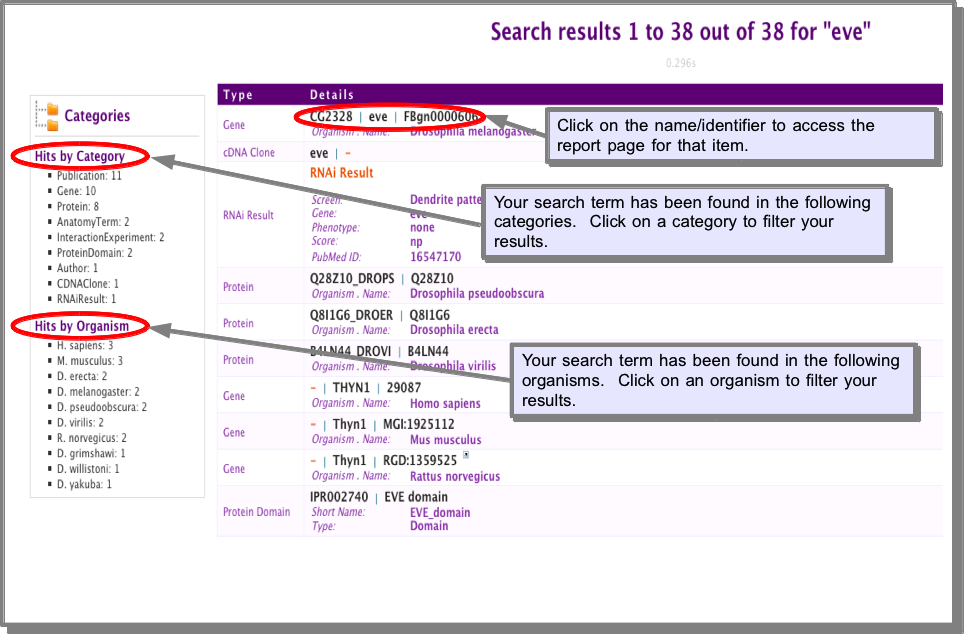
The results from a quick search link to Report Pages for each item found.